
This FAQ is a section in the General category of your help center knowledge base. We created this category and a few common sections to help you get started with your Help Center.
The knowledge base in the Help Center consists of three main page types: category pages, section pages, and articles. Here's the structure:
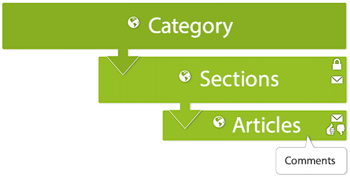
You can create your own categories, sections, and articles and modify or completely delete ours. See the Organizing knowledge base content and Creating articles in the Help Center to learn how.
You're looking at your new Help Center. We populated it with placeholder content to help you get started. Feel free to edit or delete this content.
The Help Center is designed to provide a complete self-service support option for your customers. The Help Center contains: a knowledge base and, on Guide Professional and Enterprise, a Customer Portal for support requests. You can also add a community to your Help Center if you have Zendesk Gather.
Your customers can search for knowledge base articles to learn a task or search the community, if available, to ask fellow users questions. If your customers can't find an answer, they can submit a support request.
For more information, see Help Center guide for end users.
Each user has a Help Center profile (Guide Professional and Enterprise), so your Help Center users can get to know one another better. Profiles contain relevant information about the user, along with their activities and contributions.
How do I customize my Help Center
link to a non-existent article
https://z4nnmtestapp.zendesk.com/hc/en-us/articles/6467093051930-Test-article
https://z3nprendergast.zendesk.com/hc/en-us/articles/360015882997-How-do-I-customize-my-Help-Center
Text Size
Default
Small
Medium
Large
Huge
Headings
Heading 1
Heading 2
Heading 3
Heading 4
Italics
Italics
Text Color
Red
Blue
Green
EMOJIS
😀😆😎
Bullet List
- Point one
- Point two
- Point Three
Numbered List
- Point one
- Point two
- Point Three
Indent
Left
Right
Center
Code Block
import android.app.Application
import android.util.Log
import zendesk.android.Zendesk
import zendesk.messaging.android.DefaultMessagingFactory
/**
 * A sample [Application] with a [DefaultMessagingFactory] integration in Kotlin.
 */
class Sample : Application() {
    override fun onCreate() {
        super.onCreate()
        Zendesk.initialize(
            context = this,
            channelKey = /*"{channel_key}"*/,
            successCallback = { zendesk ->
                Log.i("IntegrationApplication", "Initialization successful")
            },
            failureCallback = { error ->
                // Tracking the cause of exceptions in your crash reporting dashboard will help to triage any unexpected failures in production
                Log.e("IntegrationApplication", "Initialization failed", error)
            },
            messagingFactory = DefaultMessagingFactory()
        )
    }
GIF
Image
Video
Basic Table
| 1 | 2 | 3 4 5 3 4 5 3 4 5 3 4 5 |
6 | 7 | 8 | 9 | ||
| 1 | 2 | 6 | 7 | 8 | 9 | |||
| 1 | 2 | 6 | 7 | 8 | 9 | |||
| 1 | 2 | 6 | 7 | 8 | 9 | |||
Complex Table
| 1 | 1 | 1 | 1 | 1 | 1 | 1 | 1 | 1 | 1 |
| 11 | 11 | 11 | 11 | 11 | 11 | 11 | 11 | 11 | 11 |
| 111 | 111 | 111 | 111 | 111 | 111 | 111 | 111 | 111 | 111 |
| 1111 | 1111 | 1111 | 1111 | 1111 | 1111 | 1111 | 1111 | 1111 | 1111 |
| 111111 | 111111 | 111111 | 111111 | 111111 | 111111 | 111111 | 111111 | 111111 | 111111 |
|
11111111 11111111 |
11111111 11111111 |
11111111 11111111 |
11111111 11111111 |
11111111 11111111 |
11111111 11111111 |
11111111 11111111 |
11111111 11111111 |
11111111 11111111 |
11111111 11111111 |
Comments
0 comments
Please sign in to leave a comment.